
How Can We Help?
Deleting users
A dealer administrator is responsible for managing the users who have access to the system. When an employee leaves or moves branches, it’s recommended to remove that user, this is part of the annual review.
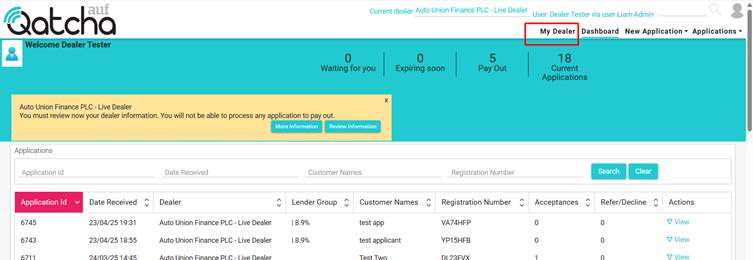
To do this, start by going to My Dealer.
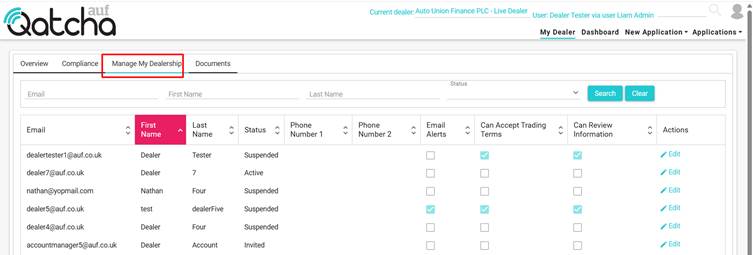
Head over to the Manage my dealership tab.
Select edit on the user you wish to remove, then select delete.
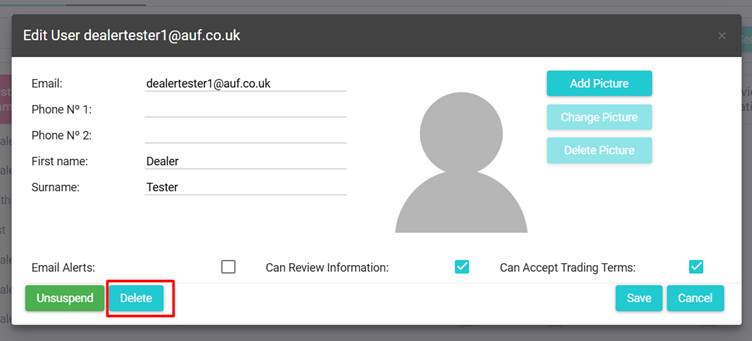
Note: suspending a user will only temporarily lock them out; this is recommended if a user’s account ever becomes compromised or a user is on extended leave.
If you have multiple branches, the user must be added to each applicable branch. By default, they will only be assigned to the active branch. For help, see Multiple Branches